「樹莓派用於裁線」:修訂間差異
| (未顯示同一使用者於中間所作的 60 次修訂) | |||
| 第13行: | 第13行: | ||
###設定auto login->Boot options | ###設定auto login->Boot options | ||
##查詢ip->ip a | ##查詢ip->ip a | ||
##查詢wifi設定 sudo nano /etc/wpa_supplicant/wpa_supplicant.conf | |||
##切換python 2.7->3.7 | ##切換python 2.7->3.7 | ||
###sudo ln -f -s /usr/bin/python3.7 /usr/bin/python | ###sudo ln -f -s /usr/bin/python3.7 /usr/bin/python | ||
| 第75行: | 第76行: | ||
##chmod 777 /tmp/ramdisk | ##chmod 777 /tmp/ramdisk | ||
##mount -t tmpfs -o size=16M tmpfs /tmp/ramdisk/ | ##mount -t tmpfs -o size=16M tmpfs /tmp/ramdisk/ | ||
#螢幕不休眠 | |||
##/etc/profile.d 下新增 screen.sh檔案 | |||
##檔案中寫入 | |||
<c> | |||
xsetdpms 0 0 0 | |||
xsets off | |||
</c> | |||
==python TTS== | ==python TTS== | ||
*[http://yhhuang1966.blogspot.com/2017/08/google-gtts-api.html 利用 Google gTTS 文字轉語音 API 讓電腦說話] | *[http://yhhuang1966.blogspot.com/2017/08/google-gtts-api.html 利用 Google gTTS 文字轉語音 API 讓電腦說話] | ||
*[https://stackoverflow.com/questions/15405082/when-running-a-pygame-script-as-root-no-sound-is-output sudo沒聲音] | |||
*pip3 install gTTS | *pip3 install gTTS | ||
<python> | <python> | ||
| 第87行: | 第96行: | ||
*sudo apt-get install libsdl1.2-dev | *sudo apt-get install libsdl1.2-dev | ||
*sudo apt-get install libsdl-mixer1.2 | *sudo apt-get install libsdl-mixer1.2 | ||
*[https://atceiling.blogspot.com/2014/02/raspberry-pi.html 樹莓派調整音量] | |||
**sudo raspi-config ->Advanced Op->A4 Audio->1 Headphones | |||
**alsamixer | |||
**.asoundrc @home | |||
***defaults.ctl.card 1 defaults.pcm.card 1 | |||
<python> | <python> | ||
from pygame import mixer | from pygame import mixer | ||
| 第118行: | 第132行: | ||
import board | import board | ||
import neopixel | import neopixel | ||
pixels = neopixel.NeoPixel(board. | pixels = neopixel.NeoPixel(board.21, 1200) | ||
pixels[0] = (255, 0, 0) | pixels[0] = (255, 0, 0) | ||
</python> | </python> | ||
*腳位接法 | |||
https://dl.dropboxusercontent.com/s/8d09k7o2loyvw6j/pi3_gpio-1.png | |||
==樹莓派新版安裝步驟== | |||
*Raspberry Pi OS Lite(64-bit) | |||
*keyboard layout->other->English(US)-English(US)->OK | |||
**username:pi | |||
**password: | |||
**login:pi password: | |||
*設定指令sudo raspi-config | |||
**1 System Options->S1 Wireless Lan->TW->SSID QCRD->tskdenko | |||
**1 System Options->S2 Audio->0 bcm2835 Headphones | |||
**1 System Options->S5 Boot/Auto Login->B2 Consol Autologin | |||
**3 Interface Options->SSH、SPI、I2C、serial port→enable | |||
**個人電腦安裝termius、winscp並以樹莓派IP登入(便於使用鍵盤複製貼上ctrl+shift+V) | |||
**5 Localisation Options->L2 Timezone->Asia->Tapiei | |||
**5 Localisation Options->L4 Wlan Country->TW | |||
*安裝pip | |||
**sudo apt-get install python3-pip | |||
*安裝W2812燈條相關模組 | |||
**sudo apt-get purge -y RPi.GPIO | |||
**sudo pip install rpi_ws281x adafruit-circuitpython-neopixel | |||
***sudo pip install rpi_ws281x adafruit-circuitpython-neopixel --break-system-packages | |||
**sudo python -m pip install --force-reinstall adafruit-blinka | |||
***sudo python3 -m pip install adafruit-blinka --break-system-packages | |||
*gTTS | |||
**sudo pip install gTTS | |||
**sudo pip install pygame | |||
*安裝paho-mqtt | |||
**sudo pip install paho-mqtt | |||
**sudo pip install paho-mqtt==1.5.1 --break-system-packages(優先使用舊版) | |||
*開機自動執行 | |||
**sudo nano .profile | |||
**最後增加/home/pi/pi.sh | |||
**到winscp中,對pi.sh右鍵→屬性→X的核取方塊有三欄都打X | |||
**sudo python /home/pi/pi.sh 或於termius cmd輸入./pi.sh,輸入後出現Connected with result code 0即表示設定完成,可以在LINE BOT線邊倉好夥伴中輸入電線名稱測試是否正常。 | |||
*新pi4 4B因WIFI連線較慢,需增加偵測是否連線延時 | |||
*都完成後,輸入sudo shutdown -F NOW將樹莓派關機 | |||
<python> | |||
import time | |||
import socket | |||
def is_connected(host, port): | |||
s = socket.socket(socket.AF_INET, socket.SOCK_STREAM) | |||
s.settimeout(2) | |||
try: | |||
s.connect((host,port)) | |||
return False | |||
except: | |||
return True | |||
finally: | |||
s.close() | |||
while is_connected("192.168.1.100",80): | |||
is_connected("192.168.1.100",80) | |||
time.sleep(1) | |||
</python> | |||
*更新pi4韌體 | |||
**sudo apt-get update | |||
**sudo rpi-update | |||
**uname -a 查詢目前pi版体(Linux raspberrypi 6.6.51-v8+ #1798 SMP PREEMPT Tue Sep 24 12:28:56 BST 2024 aarch64 GNU/Linux) | |||
*ssh連線軟體 | |||
**[https://termius.com/ termius] | |||
**[https://winscp.net/eng/download.php winscp] | |||
**[https://mqttx.app/ MQTTX] | |||
***tcp:156 ; ws:57 | |||
==nRF24== | |||
https://dl.dropboxusercontent.com/s/ogrgga12k36oijd/chrome_W7OVcg8Qom.png | |||
==Pi POST== | |||
*pip3 install requests2 | |||
==Arduino Send to Pi== | ==Arduino Send to Pi== | ||
| 第276行: | 第362行: | ||
} | } | ||
</c> | </c> | ||
==樹莓派主程式win== | |||
<python> | |||
from gtts import gTTS | |||
from pygame import mixer | |||
import requests | |||
import re | |||
import os | |||
mixer.init() | |||
#用來執行TTS | |||
def MsgtoMp3(text): | |||
mp3="c:\\python\mp3\\" + text + ".mp3" | |||
print(mp3) | |||
if not os.path.isfile(mp3): | |||
tts=gTTS(text=text, lang='zh-tw') | |||
tts.save(mp3) | |||
mixer.music.load(mp3) | |||
mixer.music.play() | |||
#用來查詢員工姓名並TTS | |||
def StafftoMp3(): | |||
f = open("C:\\python\\staff.txt") | |||
lines = f.readlines() | |||
staff='' | |||
for line in lines: | |||
line=line.replace('\n','') | |||
mydata = {'q': line} | |||
r = requests.post('http://192.168.1.100:8080/HMSFT/php/findstaff.php', data = mydata) | |||
staff += r.text | |||
f.close() | |||
staff+='已綁定' | |||
MsgtoMp3(staff) | |||
StafftoMp3() | |||
msg=input("input:") | |||
print(msg) | |||
if(re.match(r'\d{9}',msg,re.IGNORECASE)): | |||
MsgtoMp3("製令9碼") | |||
elif(re.match(r'CAR\d{3}',msg, re.IGNORECASE)): | |||
MsgtoMp3("台車號碼") | |||
</python> | |||
==樹莓派主程式pi4== | |||
<python> | |||
from gtts import gTTS | |||
from pygame import mixer | |||
import requests | |||
import re | |||
import RPi.GPIO as GPIO | |||
from lib_nrf24 import NRF24 | |||
import time | |||
import spidev | |||
import os | |||
mixer.init() | |||
GPIO.setmode(GPIO.BCM) | |||
pipes = [[0xE8, 0xE8, 0xF0, 0xF0, 0xE2],[0xF0, 0xF0, 0xF0, 0xF0, 0xE2]] | |||
radioch=0x72 | |||
#用來執行TTS | |||
def MsgtoMp3(msg): | |||
mp3="./mp3/" + msg + ".mp3" | |||
if not os.path.isfile(mp3): | |||
tts=gTTS(text=msg, lang='zh-tw') | |||
tts.save(mp3) | |||
mixer.music.load(mp3) | |||
mixer.music.play() | |||
#用來查詢員工姓名並TTS | |||
def StafftoMp3(): | |||
f = open("./staff.txt") | |||
lines = f.readlines() | |||
staff='' | |||
for line in lines: | |||
line=line.replace('\n','') | |||
mydata = {'q': line} | |||
r = requests.post('http://192.168.1.100:8080/HMSFT/php/findstaff.php', data = mydata) | |||
staff += r.text | |||
f.close() | |||
staff+='已綁定' | |||
MsgtoMp3(staff) | |||
#用來傳輸到看板顯示 | |||
def SendtoKanBan(text): | |||
# initialization | |||
radio = NRF24(GPIO, spidev.SpiDev()) | |||
radio.begin(0, 17) | |||
radio.setPayloadSize(32) | |||
radio.setChannel(radioch) | |||
radio.setDataRate(NRF24.BR_1MBPS) | |||
radio.setPALevel(NRF24.PA_MAX) | |||
radio.setAutoAck(True) | |||
radio.enableDynamicPayloads() | |||
radio.enableAckPayload() | |||
radio.openWritingPipe(pipes[0]) | |||
radio.openReadingPipe(1,pipes[1]) | |||
radio.stopListening() | |||
radio.printDetails() | |||
text=list(text) | |||
while len(text) < 32: | |||
text.append(0) | |||
radio.write(text) | |||
#用來刪除重覆list | |||
def Unique_list(listA): | |||
unique_set = set(listA) | |||
unique_list = list(unique_set) | |||
return unique_list | |||
''' | |||
程式由以下開始, | |||
上段為副程式區 | |||
''' | |||
#StafftoMp3() | |||
tie=[] | |||
staffcode=[] | |||
while True: | |||
msg=input("input:") | |||
if(re.match(r'(\d{1,4}|\d{1,4}\.{1,3})',msg)): | |||
MsgtoMp3(msg) | |||
SendtoKanBan(msg) | |||
elif(re.match(r'\d{9}',msg) or re.match(r'CAR\d{3}',msg,re.IGNORECASE) ): | |||
tie.append(msg) | |||
tie=Unique_list(tie) | |||
print(tie) | |||
elif(re.match(r'^\$IN',msg,re.IGNORECASE)): | |||
MsgtoMp3("進站成功") | |||
elif(re.match(r'^\$OUT',msg,re.IGNORECASE)): | |||
MsgtoMp3("出站成功") | |||
elif(re.match(r'[A-D]\d{4}',msg,re.IGNORECASE)): | |||
if(len(staffcode)==0): | |||
staffcode.append(msg) | |||
MsgtoMp3("人員一綁定成功") | |||
elif(len(staffcode)==1): | |||
staffcode.append(msg) | |||
staffcode=Unique_list(staffcode) | |||
if(len(staffcode)==1): | |||
MsgtoMp3("人員重覆綁定") | |||
else: | |||
fo=open("./staff.txt", "w") | |||
content=staffcode[0] + "\n" + staffcode[1] | |||
fo.write(content) | |||
staffcode=[] | |||
fo.close() | |||
StafftoMp3() | |||
</python> | |||
==樹莓派主程式pi4(增加LED燈)== | |||
<python> | |||
from gtts import gTTS | |||
from pygame import mixer | |||
import requests | |||
import re | |||
import RPi.GPIO as GPIO | |||
from lib_nrf24 import NRF24 | |||
import time | |||
import spidev | |||
import os | |||
import board | |||
import neopixel | |||
import math | |||
import json | |||
GPIO.setmode(GPIO.BCM) | |||
pipes = [[0xE8, 0xE8, 0xF0, 0xF0, 0xE2],[0xF0, 0xF0, 0xF0, 0xF0, 0xE2]] | |||
radioch=0x72 | |||
FRONT_LENGTH = 0.31 | |||
ORDER = neopixel.GRB | |||
maxled=1200 | |||
pixels = neopixel.NeoPixel(board.D21, maxled, brightness=0.2, auto_write=False, pixel_order=ORDER) | |||
stafflist=[] | |||
#用來執行TTS | |||
def MsgtoMp3(msg): | |||
mixer.init() | |||
mp3="./mp3/" + msg + ".mp3" | |||
if not os.path.isfile(mp3): | |||
tts=gTTS(text=msg, lang='zh-tw') | |||
tts.save(mp3) | |||
mixer.music.load(mp3) | |||
mixer.music.play() | |||
#os.system("sudo -u pi play -q " + mp3 + ' -t alsa') | |||
#用來查詢員工姓名並TTS | |||
def StafftoMp3(): | |||
global stafflist | |||
stafflist=[] | |||
f = open("./staff.txt") | |||
lines = f.readlines() | |||
staff='' | |||
for line in lines: | |||
line=line.replace('\n','') | |||
mydata = {'q': line} | |||
r = requests.post('http://192.168.1.100:8080/HMSFT/php/findstaff.php', data = mydata) | |||
staff += r.text | |||
stafflist.append(line) | |||
f.close() | |||
staff+='已綁定' | |||
MsgtoMp3(staff) | |||
#用來傳輸到看板顯示 | |||
def SendtoKanBan(text): | |||
# initialization | |||
radio = NRF24(GPIO, spidev.SpiDev()) | |||
radio.begin(0, 17) | |||
radio.setPayloadSize(32) | |||
radio.setChannel(radioch) | |||
radio.setDataRate(NRF24.BR_1MBPS) | |||
radio.setPALevel(NRF24.PA_MAX) | |||
radio.setAutoAck(True) | |||
radio.enableDynamicPayloads() | |||
radio.enableAckPayload() | |||
radio.openWritingPipe(pipes[0]) | |||
radio.openReadingPipe(1,pipes[1]) | |||
radio.stopListening() | |||
#radio.printDetails() | |||
text=list(text) | |||
while len(text) < 32: | |||
text.append(0) | |||
radio.write(text) | |||
#用來刪除重覆list | |||
def Unique_list(listA): | |||
unique_set = set(listA) | |||
unique_list = list(unique_set) | |||
return unique_list | |||
def LightLED(length): | |||
pixels.fill((0, 0, 0)) | |||
length = float(length) | |||
if length > 5 : | |||
length += 0.01 | |||
if length > 11 : | |||
length += 0.005 | |||
if length > 16 : | |||
length += 0.015 | |||
length = (length - FRONT_LENGTH)*60 | |||
if length > (maxled - 1) : | |||
length = (maxled - 1) | |||
if length < 0 : | |||
length = 0 | |||
uplimit = math.ceil(length); | |||
downlimit = math.floor(length); | |||
if(uplimit==downlimit): | |||
pixels[uplimit] = (255,255,255); | |||
else: | |||
pixels[uplimit] = (255,0,0) #设置第1个led灯的颜色Red | |||
pixels[downlimit] = (0,255,0) #设置第2个led灯的颜色Red | |||
pixels.show() | |||
''' | |||
程式由以下開始, | |||
上段為副程式區 | |||
''' | |||
StafftoMp3() | |||
SendtoKanBan("READY") | |||
tie={} | |||
staffcode=[] | |||
while True: | |||
msg=input("input:").upper() | |||
#裁線米數 | |||
if(re.match(r'(^\d{1,2}$|^\d{1,2}\.\d{1,3}$|^\.\d{1,3}$)',msg)): | |||
MsgtoMp3(msg) | |||
SendtoKanBan(msg) | |||
LightLED(msg) | |||
#紀錄製令或台車 | |||
elif(re.match(r'(^\d{9}$|^\d{6}$)',msg) or re.match(r'^CAR\d{3}$',msg,re.IGNORECASE) ): | |||
if not tie : | |||
tie['time']= time.strftime("%Y-%m-%d %H:%M:%S", time.localtime()) | |||
tie['station'] = 'HM010' | |||
tie['text']=[] | |||
tie['car']=[] | |||
tie['status']='' | |||
tie['staff'] = stafflist | |||
#曾經進站與否 | |||
if tie['status']=='IN': | |||
MsgtoMp3("已進站請重新確認") | |||
elif re.match(r'CAR\d{3}',msg,re.IGNORECASE): | |||
tie['car'].append(msg[-3:]) | |||
tie['car']=Unique_list(tie['car']) | |||
else: | |||
tie['text'].append(msg) | |||
tie['text']=Unique_list(tie['text']) | |||
print(tie) | |||
#進站IN | |||
elif(re.match(r'^IN$',msg,re.IGNORECASE)): | |||
if not tie : | |||
MsgtoMp3("請綁定製令或台車") | |||
elif not tie['text']: | |||
MsgtoMp3("未綁到製令") | |||
elif not tie['car']: | |||
MsgtoMp3("未綁到台車") | |||
elif tie['status']=='IN': | |||
MsgtoMp3("已進站請重新確認") | |||
else: | |||
tie['status'] = 'IN' | |||
tie['staff'] = stafflist | |||
mydata = {'data': json.dumps(tie)} | |||
headers = {'Content-Type': 'application/json'} | |||
r=requests.post('http://192.168.1.100:8080/HMSFT/tiecar.php', data = mydata) | |||
print(r.text) | |||
MsgtoMp3("進站成功") | |||
elif(re.match(r'^OUT$',msg,re.IGNORECASE)): | |||
if not tie : | |||
MsgtoMp3("請綁定製令或台車") | |||
elif tie['status'] != 'IN': | |||
MsgtoMp3("未曾進站無法出站") | |||
else: | |||
tie['time']= time.strftime("%Y-%m-%d %H:%M:%S", time.localtime()) | |||
tie['status'] = 'OUT' | |||
tie['staff'] = stafflist | |||
mydata = {'data': json.dumps(tie)} | |||
headers = {'Content-Type': 'application/json'} | |||
r=requests.post('http://192.168.1.100:8080/HMSFT/tiecar.php', data = mydata) | |||
print(r.text) | |||
tie={} | |||
MsgtoMp3("出站成功") | |||
elif(re.match(r'^CONT$',msg,re.IGNORECASE)): | |||
if not tie : | |||
MsgtoMp3("請綁定製令或台車") | |||
else: | |||
tie['status']=[] | |||
MsgtoMp3("繼續綁定") | |||
elif(re.match(r'^RESET$',msg,re.IGNORECASE)): | |||
if not tie : | |||
MsgtoMp3("請綁定製令或台車") | |||
else: | |||
tie['text']=[] | |||
tie['car']=[] | |||
tie['status']=[] | |||
MsgtoMp3("請重新綁定台車與製令") | |||
elif(re.match(r'^[A-D]\d{4}$',msg,re.IGNORECASE)): | |||
if(len(staffcode)==0): | |||
staffcode.append(msg) | |||
MsgtoMp3("人員一綁定成功") | |||
elif(len(staffcode)==1): | |||
staffcode.append(msg) | |||
staffcode=Unique_list(staffcode) | |||
if(len(staffcode)==1): | |||
MsgtoMp3("人員重覆綁定") | |||
else: | |||
fo=open("./staff.txt", "w") | |||
content=staffcode[0] + "\n" + staffcode[1] | |||
fo.write(content) | |||
staffcode=[] | |||
fo.close() | |||
StafftoMp3() | |||
elif(re.match(r'^REBOOT$',msg,re.IGNORECASE)): | |||
os.system('sudo shutdown -r now') | |||
elif(re.match(r'^RESET$',msg,re.IGNORECASE)): | |||
tie = {} | |||
MsgtoMp3("清空輸入資料") | |||
elif(re.match(r'^REBOOT$',msg,re.IGNORECASE)): | |||
MsgtoMp3("重新開機") | |||
os.system('sudo shutdown -r now') | |||
elif(re.match(r'^SHUTDOWN$',msg,re.IGNORECASE)): | |||
MsgtoMp3("正在關機") | |||
os.system('sudo shutdown -P now') | |||
</python> | |||
==樹莓派主程式pi4(mqtt)== | |||
<python> | |||
from gtts import gTTS | |||
from pygame import mixer | |||
import requests | |||
import re | |||
import RPi.GPIO as GPIO | |||
from lib_nrf24 import NRF24 | |||
import time | |||
import spidev | |||
import os | |||
import board | |||
import neopixel | |||
import math | |||
import json | |||
#下面要注意不同機器設定不同 | |||
GPIO.setmode(GPIO.BCM) | |||
pipes = [[0xE8, 0xE8, 0xF0, 0xF0, 0xE1],[0xF0, 0xF0, 0xF0, 0xF0, 0xE1]] | |||
#pipes = [[0xE8, 0xE8, 0xF0, 0xF0, 0xE3],[0xF0, 0xF0, 0xF0, 0xF0, 0xE3]] pi4-3 | |||
#pipes = [[0xE8, 0xE8, 0xF0, 0xF0, 0xE2],[0xF0, 0xF0, 0xF0, 0xF0, 0xE2]] pi4-2 | |||
#pipes = [[0xE8, 0xE8, 0xF0, 0xF0, 0xE1],[0xF0, 0xF0, 0xF0, 0xF0, 0xE1]] pi4-1 | |||
radioch=0x71 | |||
#radioch=0x73 pi4-3 | |||
#radioch=0x72 pi4-2 | |||
#radioch=0x71 pi4-1 | |||
FRONT_LENGTH = 0.29 | |||
ORDER = neopixel.GRB | |||
maxled=1200 | |||
pixels = neopixel.NeoPixel(board.D21, maxled, brightness=0.08, auto_write=False, pixel_order=ORDER) | |||
stafflist=[] | |||
machine = 'PI4-1' | |||
def LightLED(length): | |||
pixels.fill((0, 0, 0)) | |||
length = float(length) | |||
if length > 5 : | |||
length += 0 | |||
if length > 11 : | |||
length += 0.005 | |||
if length > 14.7 : | |||
length += 0.0025 | |||
if length > 16 : | |||
length += 0.0125 | |||
length = (length - FRONT_LENGTH)*60 | |||
if length > (maxled - 1) : | |||
length = (maxled - 1) | |||
if length <= 0 : | |||
length = 0 | |||
uplimit = math.ceil(length); | |||
downlimit = math.floor(length); | |||
if(uplimit==downlimit): | |||
pixels[uplimit] = (0,0,255); #blue | |||
else: | |||
pixels[uplimit] = (255,0,0) #设置第1个led灯的颜色Red | |||
pixels[downlimit] = (0,255,0) #设置第2个led灯的颜色Red | |||
if length==0 : | |||
pixels.fill((0, 0, 0)) | |||
pixels.show() | |||
#以上要注意不同機器有不同設定 | |||
#用來執行TTS | |||
def MsgtoMp3(msg): | |||
mixer.init() | |||
mp3="mp3/" + msg + ".mp3" | |||
if not os.path.isfile(mp3): | |||
tts=gTTS(text=msg, lang='zh-tw') | |||
tts.save(mp3) | |||
time.sleep(0.5) | |||
mixer.music.load(mp3) | |||
mixer.music.play() | |||
#os.system("sudo -u pi play -q " + mp3 + ' -t alsa') | |||
#用來查詢員工姓名並TTS | |||
def StafftoMp3(): | |||
global stafflist | |||
stafflist=[] | |||
with open('./staff.txt', 'r') as f: | |||
lines = f.readlines() | |||
staff='' | |||
for line in lines: | |||
line=line.replace('\n','') | |||
mydata = {'q': line} | |||
r = requests.post('http://192.168.1.100:8080/HMSFT/php/findstaff.php', data = mydata) | |||
staff += r.text | |||
stafflist.append(line) | |||
staff+='已綁定' | |||
MsgtoMp3(staff) | |||
#用來傳輸到看板顯示 | |||
def SendtoKanBan(text): | |||
# initialization | |||
pub="mosquitto_pub -h 192.168.1.156 -p 1883 -t kb/kb01 -m " + text | |||
os.system(pub) | |||
''' | |||
radio = NRF24(GPIO, spidev.SpiDev()) | |||
radio.begin(0, 17) | |||
radio.setPayloadSize(32) | |||
radio.setChannel(radioch) | |||
radio.setDataRate(NRF24.BR_1MBPS) | |||
radio.setPALevel(NRF24.PA_MAX) | |||
radio.setAutoAck(True) | |||
radio.enableDynamicPayloads() | |||
radio.enableAckPayload() | |||
radio.openWritingPipe(pipes[0]) | |||
radio.openReadingPipe(1,pipes[1]) | |||
radio.stopListening() | |||
#radio.printDetails() | |||
text=list(text) | |||
while len(text) < 32: | |||
text.append(0) | |||
radio.write(text) | |||
time.sleep(0.01) | |||
radio.write(text) | |||
time.sleep(0.01) | |||
radio.write(text) | |||
time.sleep(0.01) | |||
''' | |||
#用來刪除重覆list | |||
def Unique_list(listA): | |||
unique_set = set(listA) | |||
unique_list = list(unique_set) | |||
return unique_list | |||
#關燈條 | |||
def OffLightLED(): | |||
pixels.fill((0, 0, 0)) | |||
pixels.show() | |||
def OldInto(): | |||
tie={} | |||
with open('./into.txt', 'r') as fin: | |||
line = fin.readlines() | |||
tie = json.loads(line[0]) | |||
return tie | |||
def WritetoInto(content): | |||
with open('./into.txt', 'w') as fin: | |||
fin.write(content) | |||
#用來傳送line notify | |||
def lineNotifyMessage(token, msg): | |||
headers = { | |||
"Authorization": "Bearer " + token, | |||
"Content-Type" : "application/x-www-form-urlencoded" | |||
} | |||
payload = {'message': msg} | |||
r = requests.post("https://notify-api.line.me/api/notify", headers = headers, params = payload) | |||
return r.status_code | |||
#用來查詢目前是否為單人進站模式 | |||
def SingleType(): | |||
with open('./single.txt', 'r') as singletype: | |||
return singletype.read() | |||
''' | |||
程式由以下開始, | |||
上段為副程式區 | |||
''' | |||
smtype = SingleType() | |||
if(smtype=='S'): | |||
MsgtoMp3("單人單人裁線模式") | |||
time.sleep(3) | |||
StafftoMp3() | |||
tie=OldInto() | |||
#若儲檔紀錄與今日不同,則設定tie={} | |||
today = time.strftime("%Y-%m-%d", time.localtime()) | |||
if tie!={} and tie["time"][:10] != today : | |||
tie={} | |||
if not tie : | |||
tie['status']='' | |||
tie['time']='' | |||
tie['staff'] = stafflist | |||
tie['text']=[] | |||
tie['car']=[] | |||
#lineNotifyMessage('cuA68tKuETw1zB4ZDJVl7mY8WF4f2MMUXlFDahFoulu', '裁線'+machine+'開機') | |||
SendtoKanBan("READY") | |||
staffcode=[] | |||
while True: | |||
msginput=input("input:").upper() | |||
msgarray = msginput.split("%7C") | |||
msg = msgarray[0] | |||
#裁線米數 | |||
if(msg=='0.0'): | |||
OffLightLED(); | |||
MsgtoMp3("已關燈條") | |||
SendtoKanBan("TUBE") | |||
elif(re.match(r'(^\d{1,2}$|^\d{1,2}\.\d{1,3}$|^\.\d{1,3}$)',msg)): | |||
if float(msg)> 0.3 : | |||
LightLED(msg) | |||
else: | |||
OffLightLED() | |||
SendtoKanBan(msg) | |||
MsgtoMp3(msg) | |||
elif(re.match(r'TESTLT',msg,re.IGNORECASE)): | |||
j=10.0 | |||
for i in range(0,200,1): | |||
j+= 0.1 | |||
LightLED(j) | |||
time.sleep(0.5) | |||
#紀錄製令或台車 | |||
elif(re.match(r'(^\d{9}$|^\d{6}$)',msg) or re.match(r'^CAR\d{3}$',msg,re.IGNORECASE) or re.match(r'^%\$AGRF',msg,re.IGNORECASE) ): | |||
if tie['time']=='' : | |||
tie['time']= time.strftime("%Y-%m-%d %H:%M:%S", time.localtime()) | |||
tie['station'] = 'HM010' | |||
tie['text']=[] | |||
tie['car']=[] | |||
tie['status']='' | |||
tie['staff'] = stafflist | |||
#曾經進站與否 | |||
if tie['status']=='IN': | |||
MsgtoMp3("已進站請重新確認") | |||
elif (re.match(r'CAR\d{3}',msg,re.IGNORECASE) or re.match(r'^%\$AGRF',msg,re.IGNORECASE) ) : | |||
tie['car'].append(msg) | |||
tie['car']=Unique_list(tie['car']) | |||
else: | |||
tie['text'].append(msg) | |||
tie['text']=Unique_list(tie['text']) | |||
print(tie) | |||
#進站IN | |||
elif(re.match(r'^IN$',msg,re.IGNORECASE)): | |||
if not tie['time'] : | |||
MsgtoMp3("請綁定製令或台車") | |||
elif not tie['text']: | |||
MsgtoMp3("未綁到製令") | |||
elif not tie['car']: | |||
MsgtoMp3("未綁到台車") | |||
elif tie['status']=='IN': | |||
MsgtoMp3("已進站請重新確認") | |||
else: | |||
if not tie['time']: #20200728 | |||
tie['time']= time.strftime("%Y-%m-%d %H:%M:%S", time.localtime()) | |||
tie['status'] = msg | |||
tie['staff'] = stafflist | |||
mydata = {'data': json.dumps(tie)} | |||
headers = {'Content-Type': 'application/json'} | |||
r=requests.post('http://192.168.1.100:8080/HMSFT/tiecar.php', data = mydata) | |||
print(r.text) | |||
oldtime=tie['time'] #20200728 | |||
WritetoInto(json.dumps(tie)) | |||
MsgtoMp3("進站成功") | |||
SendtoKanBan('IN') | |||
elif(re.match(r'^P?OUT$',msg,re.IGNORECASE)): #20200728 | |||
if tie['time']=='' : | |||
MsgtoMp3("請綁定製令或台車") | |||
elif tie['status'] != 'IN': | |||
MsgtoMp3("未曾進站無法出站") | |||
else: | |||
tie['time']= time.strftime("%Y-%m-%d %H:%M:%S", time.localtime()) | |||
tie['status'] = msg #20200728 | |||
tie['staff'] = stafflist | |||
mydata = {'data': json.dumps(tie)} | |||
headers = {'Content-Type': 'application/json'} | |||
r=requests.post('http://192.168.1.100:8080/HMSFT/tiecar.php', data = mydata) | |||
print(r.text) | |||
tie={} | |||
tie['status']='' | |||
tie['staff'] = stafflist | |||
tie['text']=[] | |||
tie['car']=[] | |||
tie['time']='' | |||
WritetoInto(json.dumps(tie)) | |||
MsgtoMp3("出站成功") | |||
SendtoKanBan('OUT') | |||
elif(re.match(r'^CONT$',msg,re.IGNORECASE)): | |||
if not tie : | |||
MsgtoMp3("請綁定製令或台車") | |||
else: | |||
tie['status']='' | |||
MsgtoMp3("繼續綁定") | |||
elif(re.match(r'^RESET$',msg,re.IGNORECASE)): | |||
if not tie : | |||
MsgtoMp3("請綁定製令或台車") | |||
else: | |||
tie['text']=[] | |||
tie['car']=[] | |||
tie['status']='' | |||
tie['time']='' #20200728 | |||
MsgtoMp3("請重新綁定台車與製令") | |||
elif(re.match(r'^[A-D]\d{4}$',msg,re.IGNORECASE)): | |||
if tie['status']== 'IN': | |||
MsgtoMp3("請先出站才可以進行人員更換") | |||
elif(len(staffcode)==0): | |||
staffcode.append(msg) | |||
MsgtoMp3("第一個人員一綁定成功") | |||
if(smtype=='S'): | |||
with open('./staff.txt', 'w') as fo: | |||
content=staffcode[0] | |||
fo.write(content) | |||
staffcode=[] | |||
StafftoMp3() | |||
elif(len(staffcode)==1): | |||
staffcode.append(msg) | |||
staffcode=Unique_list(staffcode) | |||
if(len(staffcode)==1): | |||
MsgtoMp3("人員重覆綁定") | |||
else: | |||
with open('./staff.txt', 'w') as fo: | |||
content=staffcode[0] + "\n" + staffcode[1] | |||
fo.write(content) | |||
staffcode=[] | |||
StafftoMp3() | |||
elif(re.match(r'^RETURN$',msg,re.IGNORECASE)): #20200728 | |||
tie['time']=oldtime | |||
print(tie) | |||
MsgtoMp3('取回進站時間') | |||
elif(re.match(r'^REBOOT$',msg,re.IGNORECASE)): | |||
os.system('sudo shutdown -r now') | |||
elif(re.match(r'^REBOOT$',msg,re.IGNORECASE)): | |||
MsgtoMp3("重新開機") | |||
os.system('sudo shutdown -r now') | |||
elif(re.match(r'^SHUTDOWN$',msg,re.IGNORECASE)): | |||
MsgtoMp3("正在關機") | |||
os.system('sudo shutdown -P now') | |||
elif(re.match(r'^(SINGLE|MULTI)$',msg,re.IGNORECASE)): | |||
if tie['status']== 'IN': | |||
MsgtoMp3("請先出站才可以進行切換模式") | |||
elif (msg=='SINGLE'): | |||
smtype='S' | |||
MsgtoMp3("切換到單人裁線模式") | |||
else: | |||
smtype='M' | |||
MsgtoMp3("切換到雙人裁線模式") | |||
with open('./single.txt', 'w') as fo: | |||
fo.write(smtype) | |||
elif(re.match(r'^HELP$',msg,re.IGNORECASE)): | |||
lineNotifyMessage('cuA68tKuETw1zB4ZDJVl7mY8WF4f2MMUXlFDahFoulu', '裁線'+machine+'求救 Mayday Mayday!!') | |||
SendtoKanBan("SOS") | |||
elif(re.match(r'^RERUN$',msg,re.IGNORECASE)): | |||
SendtoKanBan('RERUN') | |||
MsgtoMp3("重開程式") | |||
os.system('/home/pi/pi.sh') | |||
elif(re.match(r'^SHIT$',msg,re.IGNORECASE)): | |||
SendtoKanBan('SOS ?') | |||
MsgtoMp3("沒壞吧 可以開機呀") | |||
elif(re.match(r'^INFO$',msg,re.IGNORECASE)): | |||
print("tie:") | |||
print(tie) | |||
</python> | |||
==Arduino to LED看板== | |||
<c> | |||
//接收及LED看板 | |||
//20200604以pi send to Arduino uno | |||
//20190221增加經過10分鐘看板未輸入條碼,LED看板全黑 | |||
#include <SPI.h> | |||
#include <RF24.h> | |||
#include <Adafruit_GFX.h> // Core graphics library | |||
#include <RGBmatrixPanel.h> // Hardware-specific library | |||
#include <printf.h> | |||
#define CLK 8 // MUST be on PORTB! (Use pin 11 on Mega) | |||
#define LAT A3 | |||
#define OE 9 | |||
#define A A0 | |||
#define B A1 | |||
#define C A2 | |||
RGBmatrixPanel matrix(A, B, C, CLK, LAT, OE, false); | |||
RF24 rf24(A4, A5); // CE腳, CSN腳 | |||
const uint64_t addr = 0xF0F0F0F0E3LL; | |||
//const uint64_t addr = 0xF0F0F0F0E3LL; p4-3 | |||
//const uint64_t addr = 0xF0F0F0F0E2LL; p4-2 | |||
//const uint64_t addr = 0xF0F0F0F0E1LL; p4-1 | |||
const uint64_t pipe = 0xE8E8F0F0E3LL; | |||
//const uint64_t pipe = 0xE8E8F0F0E3LL; p4-3 | |||
//const uint64_t pipe = 0xE8E8F0F0E2LL; p4-2 | |||
//const uint64_t pipe = 0xE8E8F0F0E1LL; p4-1 | |||
void setup() { | |||
Serial.begin(9600); | |||
printf_begin(); | |||
rf24.begin(); | |||
matrix.begin(); | |||
rf24.setChannel(0x73); | |||
//rf24.setChannel(0x73); p4-3 | |||
//rf24.setChannel(0x72); p4-2 | |||
//rf24.setChannel(0x71); p4-1 | |||
rf24.setPALevel(RF24_PA_MAX); | |||
rf24.setDataRate(RF24_1MBPS); | |||
rf24.openReadingPipe(1, pipe); // 開啟通道和位址 | |||
rf24.enableDynamicPayloads(); | |||
rf24.powerUp(); | |||
rf24.startListening(); // 開始監聽無線廣播 | |||
rf24.printDetails(); | |||
matrix.fillScreen(matrix.Color333(0, 0, 0)); | |||
matrix.setTextColor(matrix.Color333(7,0,0)); | |||
matrix.setCursor(8, 4); | |||
matrix.print("TSK"); | |||
} | |||
unsigned long starttime; | |||
unsigned long runtime; | |||
void loop() { | |||
starttime = millis()/60000; | |||
if (rf24.available()) { | |||
char msg[32] = ""; | |||
//char s[10]; | |||
runtime = millis()/60000; | |||
rf24.read(msg, sizeof(msg)); | |||
String myString = String(msg); | |||
Serial.println(myString); | |||
int sX=(myString.length() >=5)? 1:5 ; | |||
matrix.setCursor(sX, 8); | |||
matrix.fillScreen(matrix.Color333(0, 0, 0)); // fill the screen with 'black' | |||
//線長大於等於10紅色,小於10橙色 | |||
if(atof(msg)<3){ | |||
matrix.setTextColor(matrix.Color333(0,7,3)); | |||
}else if(atof(msg)>=3 && atof(msg)<10){ | |||
matrix.setTextColor(matrix.Color333(7,3,0)); | |||
}else{ | |||
matrix.setTextColor(matrix.Color333(7,0,0)); | |||
} | |||
delay(30); | |||
matrix.setTextSize(1); | |||
matrix.print(myString); | |||
matrix.setCursor(0, 0); | |||
//綠色 | |||
matrix.setTextColor(matrix.Color333(0,7,0)); | |||
matrix.print("--> m"); | |||
//Serial.println(myString); | |||
} | |||
//超過10分鐘沒有輸入條碼,則關閉LED看板 | |||
if((starttime-runtime)>=10){ | |||
matrix.fillScreen(matrix.Color333(0, 0, 0)); | |||
} | |||
//Serial.println(starttime-runtime); | |||
delay(300); | |||
} | |||
</c> | |||
==Raspberry pi4 neopixel== | |||
* board.D10 max 5m | |||
* board.D18 同步 board.D12(擇一) max 15m | |||
* board.D21 max 35m | |||
* other pin cant't work | |||
於 2024年10月7日 (一) 17:05 的最新修訂
安裝樹派
- 下載Raspbian Buster Lite
- 下載克隆軟體balenaEtcher
- Raspberry Pi設定
- 預設帳密 帳號: pi 密碼: raspberry
- 設定指令sudo raspi-config
- 變更密碼->1 Change User PW->
- 設定時區I2->Change Timezone->Asia->Taipei
- 設定WIFI國別->I4 Change Wi-fi Country->TW Taiwan
- 設定WIFI帳密->2 Network Options->N2 Wi-fi->輸入WIFI的SSID->輸入WIFI密碼
- 設定鍵盤 Layout->4 Localisation Options->I3 Change Keyboard Layout->Generic 104-Key PC->US->English (US)->No AltGr Key->Left Logo Key
- 啟動SSH->5 Interfacing Options->P2 SSH->YES
- 設定auto login->Boot options
- 查詢ip->ip a
- 查詢wifi設定 sudo nano /etc/wpa_supplicant/wpa_supplicant.conf
- 切換python 2.7->3.7
- sudo ln -f -s /usr/bin/python3.7 /usr/bin/python
- 安裝pip
- sudo apt-get install python3-pip
- 安裝distutils
- sudo apt-get install python3-distutils
- sudo apt-get install python3-dev
- 安裝pyserial
- sudo pip3 install pyserial
- 修改/boot/cmdline.txt
- dwc_otg.lpm_enable=0 console=ttyAMA0,9600 kgdboc=ttyAMA0,9600 console=tty1 root=/dev/mmcblk0p2 rootfstype=ext4 rootwait
- 樹莓派串口通信開發環境
- pip3 install RPi.GPIO
- 安裝git
- sudo apt-get update
- sudo apt-get install git
- nRF24L01模組
- Wireless Pi to Pi Python Communication with NRF24L01+
- sudo raspi-config
- 5.Interfacing options->P4 SPI Enable->restart
- On my Pi in python I use that : pipes = [0xF0F0F0F0E1, 0xF0F0F0F0D2] && And On my Arduino Nano : const uint64_t addresses[2] = { 0xF0F0F0F0E1LL, 0xF0F0F0F0D2LL };
- nRF24L01模組2 py-nrf24
- pip3 install nrf24
- https://github.com/bjarne-hansen/py-nrf24
- nRF24L01模組3 Syrex-o/lib_nrf24
- enable SPI in raspi-config
- wget https://github.com/Gadgetoid/py-spidev/archive/master.zip
- unzip master.zip
- rm master.zip
- cd ./py-spidev-master
- sudo python3 setup.py install
- mkdir /home/pi/NRF24L01
- cd /home/pi/NRF24L01
- git clone https://github.com/Syrex-o/lib_nrf24
- cd ./lib_nrf24/
- cp lib_nrf24.py /home/pi/NRF24L01/
- sudo apt-get install python3-rpi.gpio -y
- nRF24L01模組4
- enable SPI
- sudo apt-get update
- sudo apt-get install python-dev python3-dev
- wget https://github.com/doceme/py-spidev/archive/master.zip
- unzip master.zip
- cd py-spidev-master
- sudo python setup.py install
- sudo python3 setup.py install
- cd Desktop
- mkdir NRF24L01
- cd NRF24L01
- git clone https://github.com/BLavery/lib_nrf24
- cd lib_nrf24/
- cp lib_nrf24.py ~Desktop/NRF24L01
Pi4
- hdmi無法顯示時
- hdmi_drive=2
- hdmi_group=2
- hdimi_mode=42
- 將內存mount to RAMDISK
- mkdir /tmp/ramdisk
- chmod 777 /tmp/ramdisk
- mount -t tmpfs -o size=16M tmpfs /tmp/ramdisk/
- 螢幕不休眠
- /etc/profile.d 下新增 screen.sh檔案
- 檔案中寫入
<c> xsetdpms 0 0 0 xsets off </c>
python TTS
- 利用 Google gTTS 文字轉語音 API 讓電腦說話
- sudo沒聲音
- pip3 install gTTS
<python> from gtts import gTTS tts=gTTS(text='生日快樂', lang='zh-tw') tts.save("\tmp\ramdisk\happybirthday.mp3") </python>
- pip3 install pygame
- sudo apt-get install libsdl1.2-dev
- sudo apt-get install libsdl-mixer1.2
- 樹莓派調整音量
- sudo raspi-config ->Advanced Op->A4 Audio->1 Headphones
- alsamixer
- .asoundrc @home
- defaults.ctl.card 1 defaults.pcm.card 1
<python> from pygame import mixer mixer.init() mixer.music.load('\tmp\ramdisk\happybirthday.mp3') mixer.music.play() </python>
- 判斷是否下載TTS與播放
<python> from gtts import gTTS from pygame import mixer import os mixer.init()
while True:
   msg=input("Input a string or a value:")
   mp3="c:\\python\mp3\\" + msg + ".mp3"
   if not os.path.isfile(mp3):
       tts=gTTS(text=msg, lang='zh-tw')
       tts.save(mp3)
   mixer.music.load(mp3)
   mixer.music.play()
</python>
WS2812B LED燈條
- Python Installation of NeoPixel Library
- sudo pip3 install rpi_ws281x adafruit-circuitpython-neopixel
- sudo python3 -m pip install --force-reinstall adafruit-blinka
- python
<python> import board import neopixel pixels = neopixel.NeoPixel(board.21, 1200) pixels[0] = (255, 0, 0) </python>
- 腳位接法
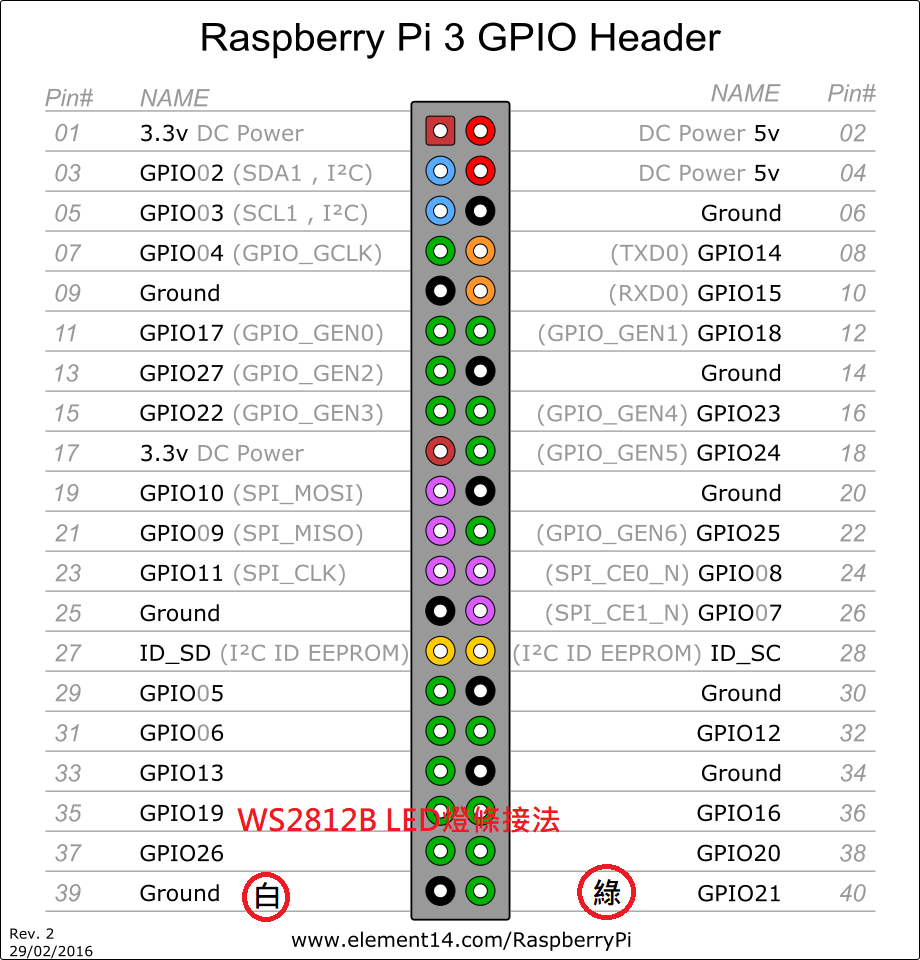
樹莓派新版安裝步驟
- Raspberry Pi OS Lite(64-bit)
- keyboard layout->other->English(US)-English(US)->OK
- username:pi
- password:
- login:pi password:
- 設定指令sudo raspi-config
- 1 System Options->S1 Wireless Lan->TW->SSID QCRD->tskdenko
- 1 System Options->S2 Audio->0 bcm2835 Headphones
- 1 System Options->S5 Boot/Auto Login->B2 Consol Autologin
- 3 Interface Options->SSH、SPI、I2C、serial port→enable
- 個人電腦安裝termius、winscp並以樹莓派IP登入(便於使用鍵盤複製貼上ctrl+shift+V)
- 5 Localisation Options->L2 Timezone->Asia->Tapiei
- 5 Localisation Options->L4 Wlan Country->TW
- 安裝pip
- sudo apt-get install python3-pip
- 安裝W2812燈條相關模組
- sudo apt-get purge -y RPi.GPIO
- sudo pip install rpi_ws281x adafruit-circuitpython-neopixel
- sudo pip install rpi_ws281x adafruit-circuitpython-neopixel --break-system-packages
- sudo python -m pip install --force-reinstall adafruit-blinka
- sudo python3 -m pip install adafruit-blinka --break-system-packages
- gTTS
- sudo pip install gTTS
- sudo pip install pygame
- 安裝paho-mqtt
- sudo pip install paho-mqtt
- sudo pip install paho-mqtt==1.5.1 --break-system-packages(優先使用舊版)
- 開機自動執行
- sudo nano .profile
- 最後增加/home/pi/pi.sh
- 到winscp中,對pi.sh右鍵→屬性→X的核取方塊有三欄都打X
- sudo python /home/pi/pi.sh 或於termius cmd輸入./pi.sh,輸入後出現Connected with result code 0即表示設定完成,可以在LINE BOT線邊倉好夥伴中輸入電線名稱測試是否正常。
- 新pi4 4B因WIFI連線較慢,需增加偵測是否連線延時
- 都完成後,輸入sudo shutdown -F NOW將樹莓派關機
<python> import time import socket
def is_connected(host, port):
   s = socket.socket(socket.AF_INET, socket.SOCK_STREAM)
   s.settimeout(2)
   try:
       s.connect((host,port))
       return False
   except:
       return True
   finally:
       s.close()
while is_connected("192.168.1.100",80):
   is_connected("192.168.1.100",80)
   time.sleep(1)
</python>
- 更新pi4韌體
- sudo apt-get update
- sudo rpi-update
- uname -a 查詢目前pi版体(Linux raspberrypi 6.6.51-v8+ #1798 SMP PREEMPT Tue Sep 24 12:28:56 BST 2024 aarch64 GNU/Linux)
- ssh連線軟體
nRF24
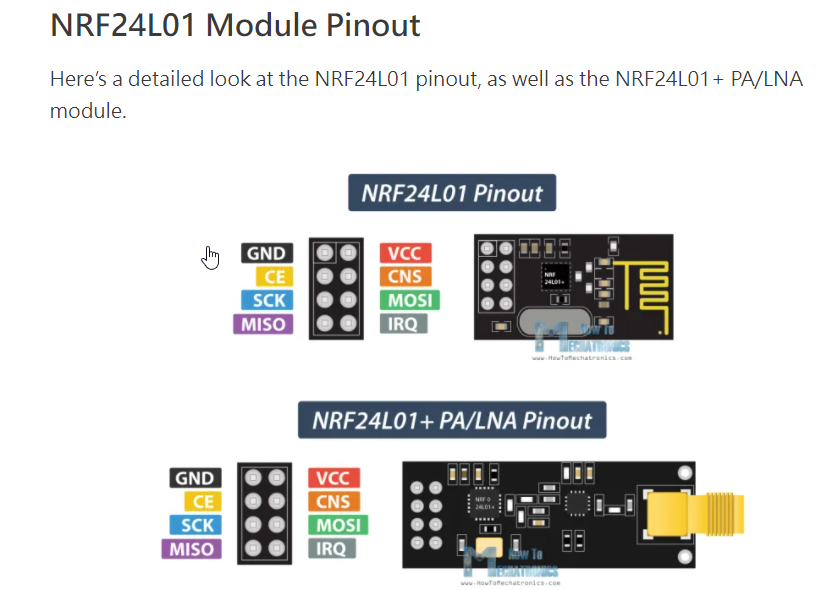
Pi POST
- pip3 install requests2
Arduino Send to Pi
- Arduino Send to Pi
<c>
- include <SPI.h>
- include <RF24.h>
- include <printf.h>
RF24 rf24(A0, A1); // CE腳, CSN腳
//Arduino Send to PI
const uint64_t addr = 0xF0F0F0F0E1LL;
int i=0; void setup() {
 Serial.begin(9600);
 printf_begin();
 rf24.begin();
 rf24.setChannel(0x76);       // 設定頻道編號
 rf24.openWritingPipe(addr); // 設定通道位址
 rf24.setPALevel(RF24_PA_MAX);   // 設定廣播功率
 rf24.setDataRate(RF24_1MBPS); // 設定傳輸速率
 rf24.enableDynamicPayloads();
 rf24.powerUp();
 rf24.stopListening();       // 停止偵聽;設定成發射模式
 rf24.printDetails();
}
void loop(void) {
 const char text[] = "Hello World!";
 rf24.write(&text, sizeof(text));
 delay(1000);
} </c>
- PI Read From Arduino
<python> import RPi.GPIO as GPIO from lib_nrf24 import NRF24 import time import spidev
- This is Pi & read from arduino
GPIO.setmode(GPIO.BCM)
pipes = [[0xE8, 0xE8, 0xF0, 0xF0, 0xE1],[0xF0, 0xF0, 0xF0, 0xF0, 0xE1]]
- initialization
radio = NRF24(GPIO, spidev.SpiDev()) radio.begin(0, 17)
radio.setPayloadSize(32) radio.setChannel(0x76) radio.setDataRate(NRF24.BR_1MBPS) radio.setPALevel(NRF24.PA_MIN)
radio.setAutoAck(True) radio.enableDynamicPayloads() radio.enableAckPayload()
radio.openReadingPipe(1, pipes[1])
- radio.openWritingPipe(pipes[1])
radio.printDetails() radio.startListening()
- message = list(input("Enter a message to send: "))
while True:
   while  not radio.available(0):
       time.sleep(1/100)
   receiveMessage = []
   radio.read(receiveMessage, radio.getDynamicPayloadSize())
   print("received: {}".format(receiveMessage))
   print("Translating our received Message into unicode characters...")
   string = ""
   for n in receiveMessage:
       if (n>=32 and n<=126):
           string += chr(n)
   print("Our received message decodes to: {}".format(string))
</python>
Pi SENT TO Arduino不確認
- Pi
<python> import RPi.GPIO as GPIO from lib_nrf24 import NRF24 import time import spidev
- This is Pi : read & send to arduino
GPIO.setmode(GPIO.BCM)
pipes = [[0xE8, 0xE8, 0xF0, 0xF0, 0xE2],[0xF0, 0xF0, 0xF0, 0xF0, 0xE2]]
- initialization
radio = NRF24(GPIO, spidev.SpiDev()) radio.begin(0, 17)
radio.setPayloadSize(32) radio.setChannel(0x72) radio.setDataRate(NRF24.BR_1MBPS) radio.setPALevel(NRF24.PA_MAX)
radio.setAutoAck(True) radio.enableDynamicPayloads() radio.enableAckPayload()
radio.openWritingPipe(pipes[0]) radio.openReadingPipe(1,pipes[1]); radio.stopListening()
radio.printDetails()
while True:
   message = list(input("Enter a message to send: "))

   while len(message) < 32:
       message.append(0)
   radio.write(message)
</python>
- Arduino
<c>
- include <SPI.h>
- include <RF24.h>
- include <printf.h>
RF24 rf24(A0, A1); // CE腳, CSN腳
//Arduino Send to PI
const uint64_t addr = 0xF0F0F0F0E2LL; const uint64_t pipe = 0xE8E8F0F0E2LL; int i=0; void setup() {
 Serial.begin(9600);
 printf_begin();
 rf24.begin();
 rf24.setPALevel(RF24_PA_MAX);   // 設定廣播功率
 rf24.setChannel(0x72);       // 設定頻道編號
 rf24.setDataRate(RF24_1MBPS); // 設定傳輸速率
 rf24.openWritingPipe(addr); // 設定通道位址
 rf24.openReadingPipe(1,pipe);
 rf24.enableDynamicPayloads();
 rf24.powerUp();
 rf24.startListening();
 rf24.printDetails();
}
void loop(void) {
 if(rf24.available()){
   char msg[32] = "";
   rf24.read(msg, sizeof(msg));
   Serial.println(msg); // 顯示訊息內容
 }
} </c>
樹莓派主程式win
<python> from gtts import gTTS from pygame import mixer import requests import re import os mixer.init()
- 用來執行TTS
def MsgtoMp3(text):
   mp3="c:\\python\mp3\\" + text + ".mp3"
   print(mp3)
   if not os.path.isfile(mp3):
       tts=gTTS(text=text, lang='zh-tw')
       tts.save(mp3)
   mixer.music.load(mp3)
   mixer.music.play()
- 用來查詢員工姓名並TTS
def StafftoMp3():
   f = open("C:\\python\\staff.txt")
   lines = f.readlines()
   staff=
   for line in lines:
       line=line.replace('\n',)
       mydata = {'q': line}
       r = requests.post('http://192.168.1.100:8080/HMSFT/php/findstaff.php', data = mydata)
       staff += r.text
   f.close()
   staff+='已綁定'
   MsgtoMp3(staff)
StafftoMp3()
msg=input("input:") print(msg)
if(re.match(r'\d{9}',msg,re.IGNORECASE)):
MsgtoMp3("製令9碼")
elif(re.match(r'CAR\d{3}',msg, re.IGNORECASE)):
MsgtoMp3("台車號碼")
</python>
樹莓派主程式pi4
<python> from gtts import gTTS from pygame import mixer import requests import re import RPi.GPIO as GPIO from lib_nrf24 import NRF24 import time import spidev import os
mixer.init() GPIO.setmode(GPIO.BCM) pipes = [[0xE8, 0xE8, 0xF0, 0xF0, 0xE2],[0xF0, 0xF0, 0xF0, 0xF0, 0xE2]] radioch=0x72
- 用來執行TTS
def MsgtoMp3(msg):
   mp3="./mp3/" + msg + ".mp3"
   if not os.path.isfile(mp3):
       tts=gTTS(text=msg, lang='zh-tw')
       tts.save(mp3)
   mixer.music.load(mp3)
   mixer.music.play()
- 用來查詢員工姓名並TTS
def StafftoMp3():
   f = open("./staff.txt")
   lines = f.readlines()
   staff=
   for line in lines:
       line=line.replace('\n',)
       mydata = {'q': line}
       r = requests.post('http://192.168.1.100:8080/HMSFT/php/findstaff.php', data = mydata)
       staff += r.text
   f.close()
   staff+='已綁定'
   MsgtoMp3(staff)
- 用來傳輸到看板顯示
def SendtoKanBan(text):
   # initialization
   radio = NRF24(GPIO, spidev.SpiDev())
   radio.begin(0, 17)

   radio.setPayloadSize(32)
   radio.setChannel(radioch)
   radio.setDataRate(NRF24.BR_1MBPS)
   radio.setPALevel(NRF24.PA_MAX)

   radio.setAutoAck(True)
   radio.enableDynamicPayloads()
   radio.enableAckPayload()

   radio.openWritingPipe(pipes[0])
   radio.openReadingPipe(1,pipes[1])
   radio.stopListening()

   radio.printDetails()
   text=list(text)
   while len(text) < 32:
       text.append(0)
   radio.write(text)
- 用來刪除重覆list
def Unique_list(listA):
   unique_set = set(listA)
   unique_list = list(unique_set)
   return unique_list
程式由以下開始, 上段為副程式區
- StafftoMp3()
tie=[] staffcode=[] while True:
   msg=input("input:")
   if(re.match(r'(\d{1,4}|\d{1,4}\.{1,3})',msg)):
       MsgtoMp3(msg)
       SendtoKanBan(msg)
   elif(re.match(r'\d{9}',msg) or re.match(r'CAR\d{3}',msg,re.IGNORECASE) ):
       tie.append(msg)
       tie=Unique_list(tie)
       print(tie)
   elif(re.match(r'^\$IN',msg,re.IGNORECASE)):
       MsgtoMp3("進站成功")
   elif(re.match(r'^\$OUT',msg,re.IGNORECASE)):
       MsgtoMp3("出站成功")
   elif(re.match(r'[A-D]\d{4}',msg,re.IGNORECASE)):
       if(len(staffcode)==0):
           staffcode.append(msg)
           MsgtoMp3("人員一綁定成功")
       elif(len(staffcode)==1):
           staffcode.append(msg)
           staffcode=Unique_list(staffcode)
           if(len(staffcode)==1):
               MsgtoMp3("人員重覆綁定")
           else:
               fo=open("./staff.txt", "w")
               content=staffcode[0] + "\n" + staffcode[1]
               fo.write(content)
               staffcode=[]
               fo.close()
               StafftoMp3()
</python>
樹莓派主程式pi4(增加LED燈)
<python> from gtts import gTTS from pygame import mixer import requests import re import RPi.GPIO as GPIO from lib_nrf24 import NRF24 import time import spidev import os import board import neopixel import math import json
GPIO.setmode(GPIO.BCM) pipes = [[0xE8, 0xE8, 0xF0, 0xF0, 0xE2],[0xF0, 0xF0, 0xF0, 0xF0, 0xE2]] radioch=0x72 FRONT_LENGTH = 0.31 ORDER = neopixel.GRB maxled=1200 pixels = neopixel.NeoPixel(board.D21, maxled, brightness=0.2, auto_write=False, pixel_order=ORDER)
stafflist=[]
- 用來執行TTS
def MsgtoMp3(msg):
   mixer.init()
   mp3="./mp3/" + msg + ".mp3"
   if not os.path.isfile(mp3):
       tts=gTTS(text=msg, lang='zh-tw')
       tts.save(mp3)
   mixer.music.load(mp3)
   mixer.music.play()

   #os.system("sudo -u pi play -q " + mp3 + ' -t alsa')
- 用來查詢員工姓名並TTS
def StafftoMp3():
   global stafflist
   stafflist=[]
   f = open("./staff.txt")
   lines = f.readlines()
   staff=
   for line in lines:
       line=line.replace('\n',)
       mydata = {'q': line}
       r = requests.post('http://192.168.1.100:8080/HMSFT/php/findstaff.php', data = mydata)
       staff += r.text
       stafflist.append(line)
   f.close()
   staff+='已綁定'
   MsgtoMp3(staff)
- 用來傳輸到看板顯示
def SendtoKanBan(text):
   # initialization
   radio = NRF24(GPIO, spidev.SpiDev())
   radio.begin(0, 17)

   radio.setPayloadSize(32)
   radio.setChannel(radioch)
   radio.setDataRate(NRF24.BR_1MBPS)
   radio.setPALevel(NRF24.PA_MAX)

   radio.setAutoAck(True)
   radio.enableDynamicPayloads()
   radio.enableAckPayload()

   radio.openWritingPipe(pipes[0])
   radio.openReadingPipe(1,pipes[1])
   radio.stopListening()

   #radio.printDetails()
   text=list(text)
   while len(text) < 32:
       text.append(0)
   radio.write(text)
- 用來刪除重覆list
def Unique_list(listA):
   unique_set = set(listA)
   unique_list = list(unique_set)
   return unique_list
def LightLED(length):
   pixels.fill((0, 0, 0))
   length = float(length)
   if length > 5 :
   	length += 0.01
   if length > 11 :
   	length += 0.005
   if length > 16 :
   	length += 0.015
   length = (length - FRONT_LENGTH)*60
   if length > (maxled - 1) :
       length = (maxled - 1)
   if length < 0 :
       length = 0
   uplimit = math.ceil(length);
   downlimit = math.floor(length);

   if(uplimit==downlimit):
       pixels[uplimit] = (255,255,255);
   else:
       pixels[uplimit] = (255,0,0)  #设置第1个led灯的颜色Red
       pixels[downlimit] = (0,255,0)   #设置第2个led灯的颜色Red
   pixels.show()
程式由以下開始, 上段為副程式區 StafftoMp3() SendtoKanBan("READY") tie={} staffcode=[] while True:
   msg=input("input:").upper()
   #裁線米數
   if(re.match(r'(^\d{1,2}$|^\d{1,2}\.\d{1,3}$|^\.\d{1,3}$)',msg)):
       MsgtoMp3(msg)
       SendtoKanBan(msg)
       LightLED(msg)
   #紀錄製令或台車
   elif(re.match(r'(^\d{9}$|^\d{6}$)',msg) or re.match(r'^CAR\d{3}$',msg,re.IGNORECASE) ):
       if not tie :
           tie['time']= time.strftime("%Y-%m-%d %H:%M:%S", time.localtime())
           tie['station'] = 'HM010'
           tie['text']=[]
           tie['car']=[]
           tie['status']=
       tie['staff'] = stafflist
       #曾經進站與否
       if tie['status']=='IN':
           MsgtoMp3("已進站請重新確認")
       elif re.match(r'CAR\d{3}',msg,re.IGNORECASE):
           tie['car'].append(msg[-3:])
           tie['car']=Unique_list(tie['car'])
       else:
           tie['text'].append(msg)
       tie['text']=Unique_list(tie['text'])
       print(tie)
   #進站IN
   elif(re.match(r'^IN$',msg,re.IGNORECASE)):
       if not tie :
           MsgtoMp3("請綁定製令或台車")
       elif not tie['text']:
           MsgtoMp3("未綁到製令")
       elif not tie['car']:
           MsgtoMp3("未綁到台車")
       elif tie['status']=='IN':
           MsgtoMp3("已進站請重新確認")
       else:
           tie['status'] = 'IN'
           tie['staff'] = stafflist
           mydata = {'data': json.dumps(tie)}
           headers = {'Content-Type': 'application/json'}
           r=requests.post('http://192.168.1.100:8080/HMSFT/tiecar.php', data = mydata)
           print(r.text)
           MsgtoMp3("進站成功")
   elif(re.match(r'^OUT$',msg,re.IGNORECASE)):
       if not tie :
           MsgtoMp3("請綁定製令或台車")
       elif tie['status'] != 'IN':
           MsgtoMp3("未曾進站無法出站")
       else:
           tie['time']= time.strftime("%Y-%m-%d %H:%M:%S", time.localtime())
           tie['status'] = 'OUT'
           tie['staff'] = stafflist
           mydata = {'data': json.dumps(tie)}
           headers = {'Content-Type': 'application/json'}
           r=requests.post('http://192.168.1.100:8080/HMSFT/tiecar.php', data = mydata)
           print(r.text)
           tie={}
           MsgtoMp3("出站成功")
   elif(re.match(r'^CONT$',msg,re.IGNORECASE)):
      if not tie :
           MsgtoMp3("請綁定製令或台車")
      else:
           tie['status']=[]
           MsgtoMp3("繼續綁定")
   elif(re.match(r'^RESET$',msg,re.IGNORECASE)):
      if not tie :
           MsgtoMp3("請綁定製令或台車")
      else:
           tie['text']=[]
           tie['car']=[]
           tie['status']=[]
           MsgtoMp3("請重新綁定台車與製令")
   elif(re.match(r'^[A-D]\d{4}$',msg,re.IGNORECASE)):
       if(len(staffcode)==0):
           staffcode.append(msg)
           MsgtoMp3("人員一綁定成功")
       elif(len(staffcode)==1):
           staffcode.append(msg)
           staffcode=Unique_list(staffcode)
           if(len(staffcode)==1):
               MsgtoMp3("人員重覆綁定")
           else:
               fo=open("./staff.txt", "w")
               content=staffcode[0] + "\n" + staffcode[1]
               fo.write(content)
               staffcode=[]
               fo.close()
               StafftoMp3()
   elif(re.match(r'^REBOOT$',msg,re.IGNORECASE)):
       os.system('sudo shutdown -r now')
   elif(re.match(r'^RESET$',msg,re.IGNORECASE)):
   	tie = {}
   	MsgtoMp3("清空輸入資料")
   elif(re.match(r'^REBOOT$',msg,re.IGNORECASE)):
   	MsgtoMp3("重新開機")
   	os.system('sudo shutdown -r now')
   elif(re.match(r'^SHUTDOWN$',msg,re.IGNORECASE)):
   	MsgtoMp3("正在關機")
   	os.system('sudo shutdown -P now')
</python>
樹莓派主程式pi4(mqtt)
<python> from gtts import gTTS from pygame import mixer import requests import re import RPi.GPIO as GPIO from lib_nrf24 import NRF24 import time import spidev import os import board import neopixel import math import json
- 下面要注意不同機器設定不同
GPIO.setmode(GPIO.BCM) pipes = [[0xE8, 0xE8, 0xF0, 0xF0, 0xE1],[0xF0, 0xF0, 0xF0, 0xF0, 0xE1]]
- pipes = [[0xE8, 0xE8, 0xF0, 0xF0, 0xE3],[0xF0, 0xF0, 0xF0, 0xF0, 0xE3]] pi4-3
- pipes = [[0xE8, 0xE8, 0xF0, 0xF0, 0xE2],[0xF0, 0xF0, 0xF0, 0xF0, 0xE2]] pi4-2
- pipes = [[0xE8, 0xE8, 0xF0, 0xF0, 0xE1],[0xF0, 0xF0, 0xF0, 0xF0, 0xE1]] pi4-1
radioch=0x71
- radioch=0x73 pi4-3
- radioch=0x72 pi4-2
- radioch=0x71 pi4-1
FRONT_LENGTH = 0.29 ORDER = neopixel.GRB maxled=1200 pixels = neopixel.NeoPixel(board.D21, maxled, brightness=0.08, auto_write=False, pixel_order=ORDER) stafflist=[] machine = 'PI4-1'
def LightLED(length):
   pixels.fill((0, 0, 0))
   length = float(length)
   if length > 5 :
       length += 0
   if length > 11 :
       length += 0.005
   if length > 14.7 :
       length += 0.0025
   if length > 16 :
       length += 0.0125
   length = (length - FRONT_LENGTH)*60
   if length > (maxled - 1) :
       length = (maxled - 1)
   if length <= 0 :
       length = 0
   uplimit = math.ceil(length);
   downlimit = math.floor(length);

   if(uplimit==downlimit):
       pixels[uplimit] = (0,0,255); #blue
   else:
       pixels[uplimit] = (255,0,0)  #设置第1个led灯的颜色Red
       pixels[downlimit] = (0,255,0)   #设置第2个led灯的颜色Red
   if length==0 :
       pixels.fill((0, 0, 0))
   pixels.show()
- 以上要注意不同機器有不同設定
- 用來執行TTS
def MsgtoMp3(msg):
   mixer.init()
   mp3="mp3/" + msg + ".mp3"
   if not os.path.isfile(mp3):
       tts=gTTS(text=msg, lang='zh-tw')
       tts.save(mp3)
       time.sleep(0.5)
   mixer.music.load(mp3)
   mixer.music.play()

   #os.system("sudo -u pi play -q " + mp3 + ' -t alsa')
- 用來查詢員工姓名並TTS
def StafftoMp3():
   global stafflist
   stafflist=[]
   with open('./staff.txt', 'r') as f:
       lines = f.readlines()

   staff=
   for line in lines:
       line=line.replace('\n',)
       mydata = {'q': line}
       r = requests.post('http://192.168.1.100:8080/HMSFT/php/findstaff.php', data = mydata)
       staff += r.text
       stafflist.append(line)
staff+='已綁定'
MsgtoMp3(staff)
- 用來傳輸到看板顯示
def SendtoKanBan(text):
   # initialization
   pub="mosquitto_pub -h 192.168.1.156 -p 1883 -t kb/kb01 -m " + text
   os.system(pub)

   radio = NRF24(GPIO, spidev.SpiDev())
   radio.begin(0, 17)

   radio.setPayloadSize(32)
   radio.setChannel(radioch)
   radio.setDataRate(NRF24.BR_1MBPS)
   radio.setPALevel(NRF24.PA_MAX)

   radio.setAutoAck(True)
   radio.enableDynamicPayloads()
   radio.enableAckPayload()

   radio.openWritingPipe(pipes[0])
   radio.openReadingPipe(1,pipes[1])
   radio.stopListening()

   #radio.printDetails()
   text=list(text)
   while len(text) < 32:
       text.append(0)
   radio.write(text)
   time.sleep(0.01)
   radio.write(text)
   time.sleep(0.01)
   radio.write(text)
   time.sleep(0.01)
- 用來刪除重覆list
def Unique_list(listA):
   unique_set = set(listA)
   unique_list = list(unique_set)
   return unique_list
- 關燈條
def OffLightLED():
   pixels.fill((0, 0, 0))
   pixels.show()
def OldInto():
   tie={}
   with open('./into.txt', 'r') as fin:
       line = fin.readlines()
   tie = json.loads(line[0])
   return tie
def WritetoInto(content):
   with open('./into.txt', 'w') as fin:
       fin.write(content)
- 用來傳送line notify
def lineNotifyMessage(token, msg):
     headers = {
         "Authorization": "Bearer " + token,
         "Content-Type" : "application/x-www-form-urlencoded"
     }

     payload = {'message': msg}
     r = requests.post("https://notify-api.line.me/api/notify", headers = headers, params = payload)
     return r.status_code
- 用來查詢目前是否為單人進站模式
def SingleType():
   with open('./single.txt', 'r') as singletype:
       return singletype.read()
程式由以下開始, 上段為副程式區 smtype = SingleType() if(smtype=='S'):
   MsgtoMp3("單人單人裁線模式")
   time.sleep(3)
StafftoMp3() tie=OldInto()
- 若儲檔紀錄與今日不同,則設定tie={}
today = time.strftime("%Y-%m-%d", time.localtime()) if tie!={} and tie["time"][:10] != today :
tie={}
if not tie :
   tie['status']=
   tie['time']=
   tie['staff'] = stafflist
   tie['text']=[]
   tie['car']=[]
- lineNotifyMessage('cuA68tKuETw1zB4ZDJVl7mY8WF4f2MMUXlFDahFoulu', '裁線'+machine+'開機')
SendtoKanBan("READY") staffcode=[] while True:
   msginput=input("input:").upper()
   msgarray = msginput.split("%7C")
   msg = msgarray[0]
   #裁線米數
   if(msg=='0.0'):
       OffLightLED();
       MsgtoMp3("已關燈條")
       SendtoKanBan("TUBE")
   elif(re.match(r'(^\d{1,2}$|^\d{1,2}\.\d{1,3}$|^\.\d{1,3}$)',msg)):

       if float(msg)> 0.3 :
       	LightLED(msg)
       else:
       	OffLightLED()

       SendtoKanBan(msg)
       MsgtoMp3(msg)
   elif(re.match(r'TESTLT',msg,re.IGNORECASE)):
       j=10.0
       for i in range(0,200,1):
           j+= 0.1
           LightLED(j)
           time.sleep(0.5)
   #紀錄製令或台車
   elif(re.match(r'(^\d{9}$|^\d{6}$)',msg) or re.match(r'^CAR\d{3}$',msg,re.IGNORECASE) or re.match(r'^%\$AGRF',msg,re.IGNORECASE) ):
       if  tie['time']== :
           tie['time']= time.strftime("%Y-%m-%d %H:%M:%S", time.localtime())
           tie['station'] = 'HM010'
           tie['text']=[]
           tie['car']=[]
           tie['status']=
       tie['staff'] = stafflist
       #曾經進站與否
       if tie['status']=='IN':
           MsgtoMp3("已進站請重新確認")
       elif (re.match(r'CAR\d{3}',msg,re.IGNORECASE) or re.match(r'^%\$AGRF',msg,re.IGNORECASE) ) :
           tie['car'].append(msg)
           tie['car']=Unique_list(tie['car'])
       else:
           tie['text'].append(msg)
       tie['text']=Unique_list(tie['text'])
       print(tie)
   #進站IN
   elif(re.match(r'^IN$',msg,re.IGNORECASE)):
       if not tie['time'] :
           MsgtoMp3("請綁定製令或台車")
       elif not tie['text']:
           MsgtoMp3("未綁到製令")
       elif not tie['car']:
           MsgtoMp3("未綁到台車")
       elif tie['status']=='IN':
           MsgtoMp3("已進站請重新確認")
       else:
           if not tie['time']: #20200728
               tie['time']= time.strftime("%Y-%m-%d %H:%M:%S", time.localtime())
           tie['status'] = msg
           tie['staff'] = stafflist
           mydata = {'data': json.dumps(tie)}
           headers = {'Content-Type': 'application/json'}
           r=requests.post('http://192.168.1.100:8080/HMSFT/tiecar.php', data = mydata)
           print(r.text)
           oldtime=tie['time'] #20200728
           WritetoInto(json.dumps(tie))
           MsgtoMp3("進站成功")
           SendtoKanBan('IN')
   elif(re.match(r'^P?OUT$',msg,re.IGNORECASE)):  #20200728
       if  tie['time']== :
           MsgtoMp3("請綁定製令或台車")
       elif tie['status'] != 'IN':
           MsgtoMp3("未曾進站無法出站")
       else:
           tie['time']= time.strftime("%Y-%m-%d %H:%M:%S", time.localtime())
           tie['status'] = msg #20200728
           tie['staff'] = stafflist
           mydata = {'data': json.dumps(tie)}
           headers = {'Content-Type': 'application/json'}
           r=requests.post('http://192.168.1.100:8080/HMSFT/tiecar.php', data = mydata)
           print(r.text)
           tie={}
           tie['status']=
           tie['staff'] = stafflist
           tie['text']=[]
           tie['car']=[]
           tie['time']=
           WritetoInto(json.dumps(tie))
           MsgtoMp3("出站成功")
           SendtoKanBan('OUT')
   elif(re.match(r'^CONT$',msg,re.IGNORECASE)):
      if not tie :
           MsgtoMp3("請綁定製令或台車")
      else:
           tie['status']=
           MsgtoMp3("繼續綁定")
   elif(re.match(r'^RESET$',msg,re.IGNORECASE)):
      if not tie :
           MsgtoMp3("請綁定製令或台車")
      else:
           tie['text']=[]
           tie['car']=[]
           tie['status']=
           tie['time']= #20200728
           MsgtoMp3("請重新綁定台車與製令")
   elif(re.match(r'^[A-D]\d{4}$',msg,re.IGNORECASE)):
       if  tie['status']== 'IN':
           MsgtoMp3("請先出站才可以進行人員更換")
       elif(len(staffcode)==0):
           staffcode.append(msg)
           MsgtoMp3("第一個人員一綁定成功")
           if(smtype=='S'):
               with open('./staff.txt', 'w') as fo:
                   content=staffcode[0]
                   fo.write(content)

               staffcode=[]
               StafftoMp3()
       elif(len(staffcode)==1):
           staffcode.append(msg)
           staffcode=Unique_list(staffcode)
           if(len(staffcode)==1):
               MsgtoMp3("人員重覆綁定")
           else:
               with open('./staff.txt', 'w') as fo:
                   content=staffcode[0] + "\n" + staffcode[1]
                   fo.write(content)

               staffcode=[]
               StafftoMp3()
   elif(re.match(r'^RETURN$',msg,re.IGNORECASE)): #20200728
       tie['time']=oldtime
       print(tie)
       MsgtoMp3('取回進站時間')
   elif(re.match(r'^REBOOT$',msg,re.IGNORECASE)):
       os.system('sudo shutdown -r now')
   elif(re.match(r'^REBOOT$',msg,re.IGNORECASE)):
       MsgtoMp3("重新開機")
       os.system('sudo shutdown -r now')
   elif(re.match(r'^SHUTDOWN$',msg,re.IGNORECASE)):
       MsgtoMp3("正在關機")
       os.system('sudo shutdown -P now')
   elif(re.match(r'^(SINGLE|MULTI)$',msg,re.IGNORECASE)):
       if  tie['status']== 'IN':
           MsgtoMp3("請先出站才可以進行切換模式")
       elif (msg=='SINGLE'):
           smtype='S'
           MsgtoMp3("切換到單人裁線模式")
       else:
           smtype='M'
           MsgtoMp3("切換到雙人裁線模式")
       with open('./single.txt', 'w') as fo:
           fo.write(smtype)
   elif(re.match(r'^HELP$',msg,re.IGNORECASE)):
       lineNotifyMessage('cuA68tKuETw1zB4ZDJVl7mY8WF4f2MMUXlFDahFoulu', '裁線'+machine+'求救 Mayday Mayday!!')
       SendtoKanBan("SOS")
   elif(re.match(r'^RERUN$',msg,re.IGNORECASE)):
       SendtoKanBan('RERUN')
       MsgtoMp3("重開程式")
       os.system('/home/pi/pi.sh')
   elif(re.match(r'^SHIT$',msg,re.IGNORECASE)):
       SendtoKanBan('SOS ?')
       MsgtoMp3("沒壞吧 可以開機呀")
   elif(re.match(r'^INFO$',msg,re.IGNORECASE)):
       print("tie:")
       print(tie)
</python>
Arduino to LED看板
<c> //接收及LED看板 //20200604以pi send to Arduino uno //20190221增加經過10分鐘看板未輸入條碼,LED看板全黑
- include <SPI.h>
- include <RF24.h>
- include <Adafruit_GFX.h> // Core graphics library
- include <RGBmatrixPanel.h> // Hardware-specific library
- include <printf.h>
- define CLK 8 // MUST be on PORTB! (Use pin 11 on Mega)
- define LAT A3
- define OE 9
- define A A0
- define B A1
- define C A2
RGBmatrixPanel matrix(A, B, C, CLK, LAT, OE, false); RF24 rf24(A4, A5); // CE腳, CSN腳 const uint64_t addr = 0xF0F0F0F0E3LL; //const uint64_t addr = 0xF0F0F0F0E3LL; p4-3 //const uint64_t addr = 0xF0F0F0F0E2LL; p4-2 //const uint64_t addr = 0xF0F0F0F0E1LL; p4-1
const uint64_t pipe = 0xE8E8F0F0E3LL; //const uint64_t pipe = 0xE8E8F0F0E3LL; p4-3 //const uint64_t pipe = 0xE8E8F0F0E2LL; p4-2 //const uint64_t pipe = 0xE8E8F0F0E1LL; p4-1
void setup() {
 Serial.begin(9600);
 printf_begin();
 rf24.begin();
 matrix.begin();
 rf24.setChannel(0x73);
 //rf24.setChannel(0x73); p4-3
 //rf24.setChannel(0x72); p4-2
 //rf24.setChannel(0x71); p4-1
 rf24.setPALevel(RF24_PA_MAX);
 rf24.setDataRate(RF24_1MBPS);
 rf24.openReadingPipe(1, pipe);  // 開啟通道和位址
 rf24.enableDynamicPayloads();
 rf24.powerUp();
 rf24.startListening();  // 開始監聽無線廣播
 rf24.printDetails();
 matrix.fillScreen(matrix.Color333(0, 0, 0));
 matrix.setTextColor(matrix.Color333(7,0,0));
 matrix.setCursor(8, 4);
 matrix.print("TSK");
}
unsigned long starttime; unsigned long runtime;
void loop() {
 starttime = millis()/60000;
 if (rf24.available()) {
   char msg[32] = "";
   //char s[10];
   runtime = millis()/60000;
   rf24.read(msg, sizeof(msg));
   String myString = String(msg);
   Serial.println(myString);
   int sX=(myString.length() >=5)? 1:5 ;
   matrix.setCursor(sX, 8);
   matrix.fillScreen(matrix.Color333(0, 0, 0)); // fill the screen with 'black'
  //線長大於等於10紅色,小於10橙色
   if(atof(msg)<3){
       matrix.setTextColor(matrix.Color333(0,7,3));
     }else if(atof(msg)>=3 && atof(msg)<10){
             matrix.setTextColor(matrix.Color333(7,3,0));
           }else{
             matrix.setTextColor(matrix.Color333(7,0,0));
     }

   delay(30);
   matrix.setTextSize(1);
   matrix.print(myString);
   matrix.setCursor(0, 0);
   //綠色
   matrix.setTextColor(matrix.Color333(0,7,0));
   matrix.print("--> m");
   //Serial.println(myString);
 }
 //超過10分鐘沒有輸入條碼,則關閉LED看板
 if((starttime-runtime)>=10){
   matrix.fillScreen(matrix.Color333(0, 0, 0));
   }
   //Serial.println(starttime-runtime);
delay(300);
}
</c>
Raspberry pi4 neopixel
- board.D10 max 5m
- board.D18 同步 board.D12(擇一) max 15m
- board.D21 max 35m
- other pin cant't work